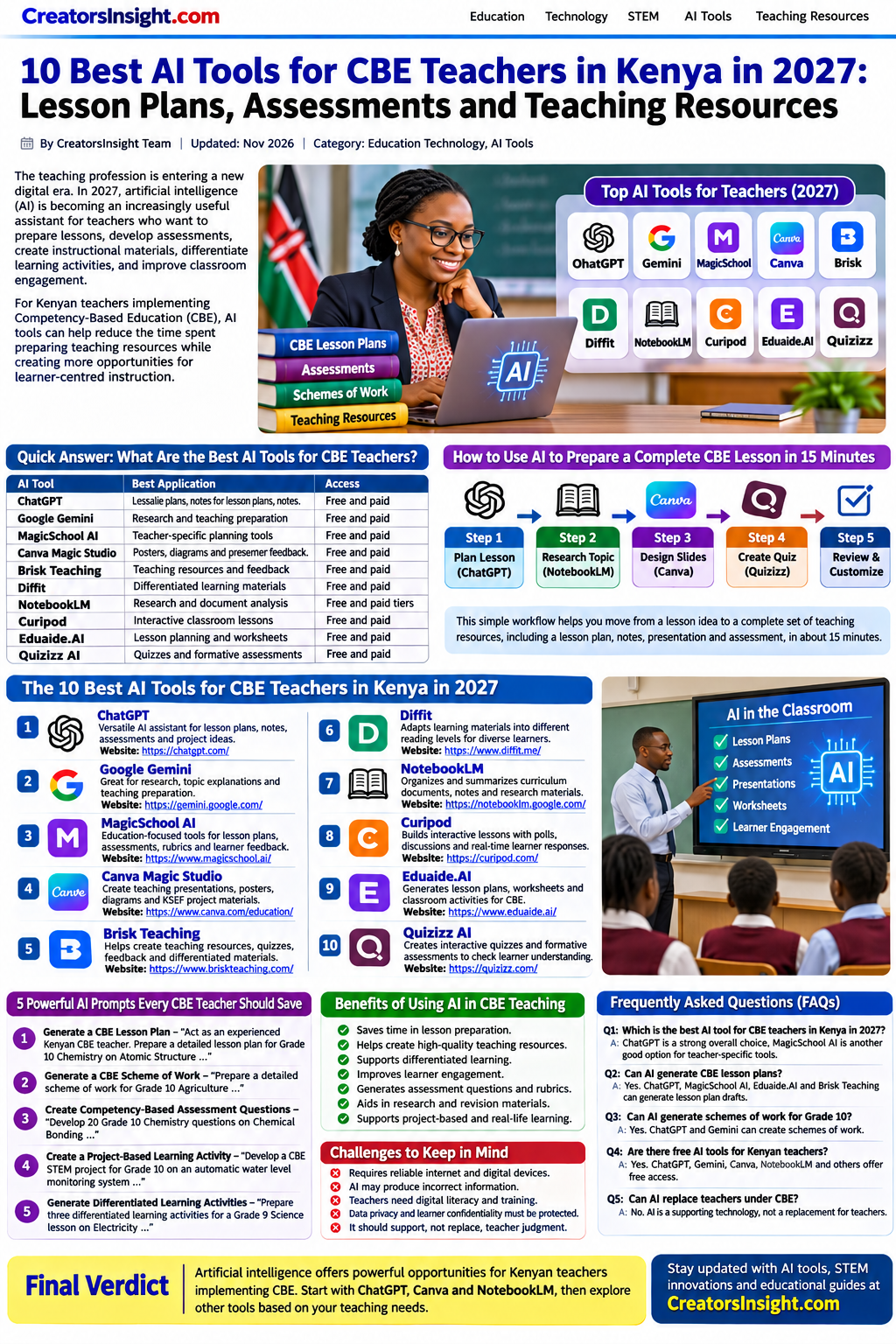
Teachers spend many hours preparing lesson plans, schemes of work, assessment rubrics, worksheets, revision materials, presentations, and classroom activities. Artificial intelligence (AI) is making it easier to prepare many of these resources.
For teachers implementing Kenya’s Competency-Based Education (CBE) curriculum, AI tools can help generate lesson ideas, organize learning activities, prepare assessment questions, create teaching visuals, and develop learner-centered resources.
Tools such as ChatGPT, Canva Magic Studio, Google Gemini, MagicSchool AI, and Curipod can support lesson preparation across different learning areas and grade levels.
However, AI-generated content should not automatically be treated as an approved KICD resource. Teachers should review every output against the relevant curriculum designs, learning outcomes, learner needs, and school requirements.
Quick Comparison: 10 Best AI Tools for Teachers
| AI Tool | What Teachers Can Use It For | Access |
|---|---|---|
| ChatGPT | Lesson plans, rubrics, teaching notes, assessments | Free and paid |
| Canva Magic Studio | Posters, diagrams, presentations, infographics | Free and paid features |
| Google Gemini | Research, explanations, teaching ideas | Free and paid options |
| MagicSchool AI | Lesson planning, rubrics, classroom resources | Free and paid options |
| Curipod | Interactive lessons, polls, learner engagement | Free and paid options |
| Eduaide.AI | Worksheets and instructional materials | Free and paid options |
| QuillBot | Grammar checking and paraphrasing | Free and paid |
| Photomath | Step-by-step mathematics explanations | Free and paid features |
| Gamma | Presentations and visual learning materials | Free and paid |
| Slidesgo AI | Presentation creation and classroom slides | Free and paid options |
Pricing, free-plan limits, and features may change. Check the official websites before subscribing.
1. ChatGPT – Best AI Tool for CBC Lesson Plans
Website: https://chatgpt.com
ChatGPT is a versatile AI assistant that can help teachers develop lesson plans, prepare teaching notes, generate assessment questions, create classroom activities, and explain difficult concepts.
For CBC and CBE teachers, it can organize content around learning outcomes, core competencies, values, pertinent and contemporary issues, key inquiry questions, and learner-centered activities.
What Can Teachers Do With ChatGPT?
- Generate lesson plans for different learning areas.
- Prepare schemes of work and weekly teaching schedules.
- Create formative assessment questions.
- Develop assessment rubrics.
- Generate differentiated learning activities.
- Prepare revision questions and marking guides.
- Simplify difficult scientific and mathematical concepts.
- Develop STEM project ideas.
Copy-and-Paste Prompt: CBC Lesson Plan
Act as an experienced Kenyan CBE teacher. Prepare a detailed 40-minute lesson plan for Grade 8 Agriculture on the topic “Composting Methods.” Include the strand, sub-strand, specific learning outcomes, key inquiry question, learning resources, introduction, lesson development, learner-centered group activities, conclusion, and formative assessment. Include relevant core competencies, values, and pertinent and contemporary issues where appropriate. Provide a simple assessment rubric with four performance levels: Exceeding Expectations, Meeting Expectations, Approaching Expectations, and Below Expectations. Use practical examples that learners can relate to in their local communities. Ensure that the teacher can verify the content against the relevant KICD curriculum design.
Why use it? ChatGPT can reduce repetitive drafting work and provide alternative ways of explaining concepts.
Limitation: Always verify curriculum details, scientific facts, and assessment requirements before using the output.

Figure 2: Example of an AI-assisted lesson planning workflow, including learning outcomes, activities, and assessment.
2. Canva Magic Studio – Best for Teaching Posters and Visual Learning Materials
Website: https://www.canva.com
Canva is a visual design platform that helps teachers create professional teaching resources without advanced graphic design skills.
Its AI-powered features can support the creation of presentations, posters, diagrams, infographics, worksheets, and classroom displays.
How CBC Teachers Can Use Canva
- Create KSEF science project posters.
- Design classroom learning charts.
- Prepare subject-specific infographics.
- Create revision posters.
- Develop digital presentations.
- Design worksheets and activity cards.
- Prepare school event posters and certificates.
Practical Example: KSEF Project Poster
Create a professional science exhibition poster for a student project titled “Automated Water Level Controller Using Arduino.” Include the problem statement, objectives, materials, system diagram, working principle, results, and conclusion. Use a clean scientific layout with readable headings and suitable illustrations.
Canva offers education-focused features and eligibility-based access. Availability and verification requirements may vary by country and institution. Do not assume that every Kenyan teacher automatically receives free access through a TSC number.
Best for: Teachers who prepare visual learning materials, project posters, and classroom displays.
3. Google Gemini – Best for Research and Explaining Difficult Concepts
Website: https://gemini.google.com
Google Gemini is an AI assistant that can help teachers explore topics, generate explanations, organize information, and develop classroom resources.
How Teachers Can Use Gemini
- Research science and technology topics.
- Generate explanations of Chemistry and Physics concepts.
- Develop classroom discussion questions.
- Suggest practical learning activities.
- Compare different teaching approaches.
- Prepare project research outlines.
- Generate ideas for environmental and agricultural projects.
Practical Example: Grade 10 STEM Project Research
Explain how a small-scale biogas production system works. Identify the scientific principles involved, suitable locally available materials, safety precautions, possible applications, and measurable variables that Grade 10 STEM learners can investigate. Organize the information into a project research outline.
Best for: Science teachers, STEM project advisors, and educators preparing research-based learning activities.
4. MagicSchool AI – Best for Teacher-Focused Planning and Assessment
Website: https://www.magicschool.ai
MagicSchool AI is designed to support teaching and learning tasks. Depending on the available plan and features, teachers can use it to develop lesson ideas, assessment questions, rubrics, and differentiated learning activities.
Useful Applications
- Lesson plan generation.
- Rubric development.
- Assessment question creation.
- Differentiated instruction.
- Classroom activity suggestions.
- Student feedback drafts.
- Reading material adaptation.
Example: Assessment Rubric Prompt
Develop a four-level assessment rubric for a Grade 8 learner activity on soil conservation. Include assessment criteria, observable learner performance, and descriptions for Exceeding Expectations, Meeting Expectations, Approaching Expectations, and Below Expectations.
Best for: Teachers who regularly prepare assessment materials and classroom resources.
5. Curipod – Best for Interactive Lessons and Learner Engagement
Website: https://curipod.com
Curipod helps teachers create interactive learning experiences. It can support lesson presentations that include questions, polls, drawing activities, and learner participation.
How Teachers Can Use Curipod
- Introduce new topics using interactive questions.
- Collect learner opinions through polls.
- Create drawing and reflection activities.
- Encourage classroom discussions.
- Check learners’ understanding during lessons.
- Develop interactive presentations.
Practical Example: Grade 7 Science Lesson
A teacher introducing environmental conservation can prepare an interactive lesson with questions such as:
- What environmental problems are common in your community?
- How can waste materials be reused?
- Why is tree planting important?
- Suggest one practical way your school can reduce plastic waste.
Best for: Teachers who want to improve learner participation and make lessons more interactive.
6. Eduaide.AI – Best for Worksheets and Instructional Resources
Website: https://www.eduaide.ai
Eduaide.AI is an AI-powered teaching assistant that can help educators develop instructional resources and classroom materials.
What Teachers Can Prepare
- Subject-based worksheets.
- Revision questions.
- Classroom activities.
- Reading comprehension exercises.
- Assessment ideas.
- Differentiated learning materials.
- Lesson resource outlines.
Practical Example: Chemistry Worksheet
Prepare a Grade 10 Chemistry worksheet on atomic structure. Include short-answer questions, structured questions, a simple application-based activity, and an answer guide. Organize the questions from basic understanding to application and analysis. Ensure scientific accuracy and make the worksheet suitable for classroom use.
Best for: Teachers who prepare regular worksheets, practice exercises, and revision resources.
7. QuillBot – Best for Grammar Checking and Improving Written Work
Website: https://quillbot.com
QuillBot is a writing assistant that can help users improve grammar, sentence structure, clarity, and readability.
Practical Uses
- Correct grammar in teaching notes.
- Improve school reports.
- Refine project introductions.
- Improve research writing.
- Paraphrase sentences while retaining their meaning.
- Check spelling and writing consistency.
Teachers and learners should never use paraphrasing to disguise copied work. Learners should understand the content, acknowledge sources, and present their own research and findings.
Best for: Teachers and learners preparing written reports and academic materials.
8. Photomath – Best for Mathematics Explanations
Website: https://photomath.com
Photomath is a mathematics learning application that can help learners understand mathematical problems through step-by-step explanations.
For example, a teacher teaching linear equations can use the following problem to discuss the steps involved in finding an unknown variable:
[ 3x + 5 = 20 ]
Subtract 5 from both sides:
[ 3x = 15 ]
Divide both sides by 3:
[ x = 5 ]
The important goal is not simply obtaining the answer. Learners should understand why each mathematical step is performed.
Best for: Mathematics teachers and learners who need additional explanations and worked examples.
9. Gamma – Best for Creating Presentations and Learning Documents
Website: https://gamma.app
Gamma is an AI-powered content creation platform that can help users turn written instructions into presentations, documents, and visual materials.
What Teachers Can Create
- Lesson presentations.
- Revision slides.
- Topic summaries.
- Project presentations.
- Training materials.
- Educational reports.
- Visual explanations.
Practical Example: Grade 10 Physics Presentation
Create a classroom presentation on electricity for Grade 10 Physics learners. Include an introduction, key concepts, simple circuit diagrams, examples, practical applications, classroom questions, and a short assessment activity. Use clear explanations and a learner-friendly visual layout.
Best for: Teachers who need to prepare presentations and visual summaries quickly.
10. Slidesgo AI – Best for Ready-Made Educational Presentation Designs
Website: https://slidesgo.com
Slidesgo provides presentation templates and AI-assisted presentation creation features. It can help teachers prepare visually organized slides for classroom teaching and school presentations.
How Teachers Can Use Slidesgo
- Create lesson presentation slides.
- Prepare subject introductions.
- Develop revision presentations.
- Design school project presentations.
- Prepare educational workshops.
- Create visual summaries of difficult topics.
Best for: Teachers who want professionally structured presentation designs without starting every slide from scratch.
How to Make AI-Generated Lesson Plans Relevant to the Kenyan CBE Curriculum
AI can help teachers prepare instructional resources, but a generated lesson plan is not automatically aligned with the official curriculum.
Teachers should use the relevant KICD curriculum designs and school guidance as the main reference when checking AI-generated content.
1. Confirm the Grade and Learning Area
Clearly specify the grade, subject or learning area, strand, and sub-strand.
2. Check the Learning Outcomes
Compare generated outcomes with the relevant curriculum design. Ensure that activities and assessment methods measure the intended outcomes.
3. Include Local Examples
Use examples that learners can understand from their communities, such as local composting practices, soil conservation, kitchen gardens, and locally available materials.
4. Use Available Learning Resources
Replace materials that are difficult to obtain with safe, affordable, and locally available alternatives where appropriate.
5. Include Learner-Centered Activities
Include group discussions, demonstrations, experiments, field activities, problem-solving, and practical tasks where suitable.
6. Review Assessment Methods
Ensure that assessment questions, observation checklists, and rubrics are connected to the stated learning outcomes.
7. Check Accuracy and Safety
Review calculations, scientific procedures, diagrams, chemical handling instructions, and electrical connections.
8. Protect Learner Information
Avoid entering identifiable learner records, examination results, personal details, or confidential school information into public AI platforms unless appropriate school approval and data protection safeguards are in place.
How Much Time Can AI Save Teachers?
AI may reduce the time required to prepare teaching resources. Actual time savings depend on the task, teacher experience, tool, and amount of editing required.
| Teaching Task | Possible Manual Preparation Time | AI-Assisted Drafting |
|---|---|---|
| Drafting a lesson plan | 30–60 minutes | 5–15 minutes |
| Preparing a worksheet | 20–40 minutes | 5–15 minutes |
| Creating assessment questions | 20–45 minutes | 5–15 minutes |
| Preparing presentation slides | 30–90 minutes | 10–30 minutes |
| Drafting a rubric | 15–30 minutes | 5–10 minutes |
These are illustrative estimates, not measured national averages. AI-generated resources still require teacher review and editing.
Can Teachers Use AI Tools on a Mobile Phone in Kenya?
Yes. Many AI platforms can be accessed through mobile browsers or Android applications, although the experience and available features differ.
Teachers using mobile phones can generate lesson plan drafts, prepare assessment questions, research teaching topics, create simple presentations, and improve written documents.
A laptop or desktop computer may be more convenient for editing long documents, preparing detailed presentations, and organizing multiple teaching resources.
Data consumption depends on the platform, prompt length, and whether images, videos, or other media are generated.
Responsible Use of AI in Teaching and TPAD Documentation
AI can support professional preparation, but teachers remain responsible for the quality and accuracy of their teaching records.
Teachers should:
- Review and personalize AI-generated lesson plans.
- Ensure teaching activities reflect actual classroom practice.
- Use genuine learner assessment evidence.
- Keep accurate records of teaching and learning activities.
- Follow current TSC, school, and relevant institutional guidance.
- Avoid presenting AI-generated work as evidence of activities that did not take place.
Do not assume that AI-generated lesson plans, schemes of work, or reports are automatically accepted for TPAD appraisal. Follow applicable TSC requirements and guidance from the relevant appraiser or institution.
Frequently Asked Questions About AI Tools for CBC Teachers
What is the best AI tool for CBC teachers in Kenya?
ChatGPT is a versatile option for drafting lesson plans, assessment questions, rubrics, teaching notes, and classroom activities. Canva is particularly useful for visual learning materials, while MagicSchool AI and Eduaide.AI offer teaching-focused resource generation features.
Are AI tools allowed in CBC lesson preparation?
AI can be used as a support tool for generating ideas and drafting teaching resources. Teachers should follow current official guidance from their institutions and relevant education authorities. AI-generated content should be reviewed against the applicable curriculum designs before classroom use.
Are these AI tools completely free?
Not necessarily. Some offer free plans or limited free features, while others have paid subscriptions, usage limits, or premium tools. Check the official pricing pages before depending on a particular feature.
Can AI generate a complete CBC lesson plan?
Yes. AI tools can generate structured lesson plan drafts containing learning outcomes, activities, resources, and assessment ideas. Teachers must still verify curriculum alignment, adapt the activities, and ensure that the plan suits their learners.
Can teachers use AI to prepare assessment rubrics?
Yes. AI can generate draft rubrics with assessment criteria and performance descriptions. Teachers should check that the criteria measure the intended learning outcomes and are appropriate for the learners’ level.
Can AI help Grade 10 teachers?
Yes. Teachers in Senior School can use AI to develop STEM activities, research tasks, lesson presentations, project ideas, revision questions, and assessment resources. The outputs should be checked against the relevant Senior School curriculum designs.
Can AI replace teachers?
No. AI can assist with preparation and resource development, but it cannot replace professional judgment, classroom interaction, mentorship, assessment decisions, and learner support.
Final Verdict: Which AI Tools Should Teachers Start With?
Teachers do not need to subscribe to every available platform to benefit from AI.
| Teaching Need | Recommended Tool |
|---|---|
| Lesson plans and teaching notes | ChatGPT |
| Posters and infographics | Canva |
| Research and explanations | Google Gemini |
| Rubrics and teacher resources | MagicSchool AI |
| Interactive lessons | Curipod |
| Worksheets and instructional materials | Eduaide.AI |
| Grammar and writing improvement | QuillBot |
| Mathematics explanations | Photomath |
| AI presentations | Gamma |
| Presentation templates | Slidesgo |
The most effective approach is to choose tools that solve specific teaching challenges, learn how to write clear prompts, and review every AI-generated resource before using it.
For Kenyan teachers implementing CBE, AI should be viewed as a teaching assistant—not a replacement for curriculum knowledge, professional responsibility, or meaningful interaction with learners.
About the Author

Related posts:
Kenya's New TSC Career Progression Guidelines 2026: What Every Teacher Needs to Know

TSC Launches Nationwide ICT Training for All JSS Teachers (June 2026)
LEARNER SUPPORT PROGRAMMES
TSC Salary Structure 2026/2027: How Much Will Newly Employed JSS and Replacement Teachers Earn?